


Good Lock
4.1410.00 Reviews
App Specs
- Version
- 3.0.16.6
- Updated On
- License
- Free
- Downloads
- 10,000,000+
- Developer
- Samsung Electronics Co., Ltd.
- Categories
- Tools
- Platform
- Android
Screenshots
 Analysis by AppCompare
I reach for Good Lock when the usual Samsung settings feel a little too limiting and I want my phone to fit the way I actually use it. It’s a free customization app from Samsung Electronics Co., Ltd., aimed at Galaxy owners who enjoy adjusting the interface rather than settling for its default look. I’d describe it as a set of optional tools to explore, not a makeover you need to apply all at once. That distinction matters: the best results come from changing a few things with a purpose, then living with them long enough to decide whether they help.
What to expect when making changes
Good Lock is available on Android 12 and later, and its current version is 3.0.15.0. The overall idea is appealing, but I wouldn’t expect every adjustment to make a phone feel faster. Changing a layout can make familiar actions easier to reach; adding visual flourishes is mostly about preference. I’d start by choosing one irritation—perhaps a lock screen that feels cluttered or navigation controls that don’t suit your grip—and try to solve that before opening every module. A small, deliberate change is easier to judge and undo than a full redesign.
This approach also helps set realistic expectations about speed. Customization is not the same thing as performance tuning, and a new animation or layout shouldn’t be treated as proof that the phone has become more powerful. In ordinary use, I’d judge a setup by whether it makes routine actions clearer, not by whether it feels dramatically quicker. If you care most about a minimal interface, the default Samsung controls may already be the better choice.
When several modules meet daily use
The interesting test comes after the novelty wears off. A different task switcher can be useful when I’m moving between a message, a map, and a browser, but only if its presentation helps me spot the app I need. Similarly, a lock-screen adjustment earns its place when it makes a glance more useful without turning the screen into a crowded noticeboard. I’d change one area at a time, use the phone normally, and keep only the settings that reduce friction in a real routine.
For example, imagine checking the weather before leaving home, switching to a calendar reminder, then returning to a conversation while walking to the door. A lock-screen layout or clock style that makes the information you care about easier to notice may save a few taps. But piling on extra elements can have the opposite effect: you spend more time scanning the screen and less time getting on with the task. The practical win is not maximum customization; it’s a layout that suits your habits.
Reliability, changes, and recovery
I’d treat each module as a separate experiment rather than assuming every option will behave identically. The original interface gives you a useful reference point, so it’s sensible to note what you changed and reverse a setting if the result feels awkward. That’s especially helpful when a system update or a module update changes how an adjustment appears. A customized setup can be satisfying, but the more parts you alter together, the harder it becomes to tell which one caused a surprise.
There is also a useful difference between an app that adds settings and a general-purpose launcher. A launcher usually changes the home-screen experience across a broad set of devices; Good Lock is a Samsung-focused route into deeper interface adjustments. If your priority is changing icons or arranging a home screen across different Android brands, a launcher may be the more direct tool. If you want to tailor parts of a Galaxy interface, Good Lock is the more relevant place to explore.
Worth Reading Before You Choose

Flipboard Shows What News Apps Must Do Beyond the Feed

Switching to Android Auto Means Rethinking Your Driving Routine

Google Calendar Makes a Crowded Week Easier to Manage

Ludo King Makes the Most of the Minutes Between Plans

Baby Panda World Brings Quick Play to Modern Phones, but Its Game Library Feels Busy

ESPN’s Live Game View Makes Following Close Games Easier
Who will get the most from it
I’d recommend it to Galaxy owners who enjoy experimenting, have a specific interface annoyance to fix, or want their lock screen and controls to feel more personal. It is less compelling if you rarely notice the interface, prefer a consistent out-of-the-box setup, or use a phone from another manufacturer. Availability can also depend on where you live, so it may not be an option for every interested user. The app is rated for Everyone, but the appeal is still personal: comfort with settings and a willingness to test small changes matter more than technical expertise.
Good Lock has a 3.5 average from around 7,400 ratings, with about 312 written reviews, and has passed 5 million installs. Those figures suggest that it has found a sizeable Galaxy audience, but they don’t tell me whether a particular module will suit your device or routine. I’d use the overall response as context, then make my own decision based on the changes I actually want. It’s free, which makes a careful trial easy to justify, but free doesn’t mean every option will be useful to every person.
Unleashing the Power of Customization
First off, let's talk about what Good Lock actually does. This app is like a Swiss Army knife for your phone, offering a suite of modules that let you tweak everything from the lock screen to the task manager. It’s like having a toolbox full of gadgets that can transform your phone into something uniquely yours.
The Modules that Matter
Here’s where it gets exciting. Good Lock is not just one app; it's a collection of powerful modules. Each module focuses on a different aspect of your phone’s interface. Let’s break it down:
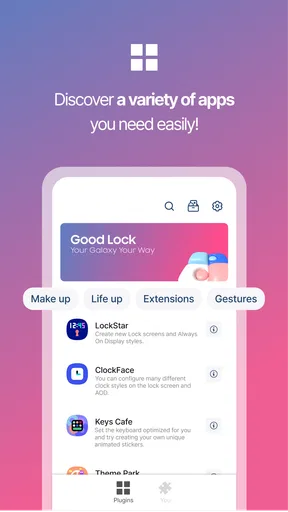
- LockStar: Customize your lock screen with different layouts, widgets, and unlock animations. Ever wanted to see your schedule or weather right on your lock screen? LockStar makes it happen.
- Task Changer: Tired of the same old task switcher? Task Changer lets you revamp it with new styles and gestures that make multitasking smoother and more intuitive.
- ClockFace: A simple yet effective way to change the look of your clock, whether it’s on the lock screen or the Always On Display. Choose from a variety of styles that suit your vibe.
- NavStar: Say goodbye to boring navigation bars. With NavStar, you can add custom buttons and change the layout to fit your needs.
A User-Friendly Experience
One of the things I love about Good Lock is its user-friendly interface. You might think such a comprehensive customization tool would be complex, but it’s surprisingly straightforward. The app guides you through each module, making it easy even for those who aren’t tech-savvy. Plus, it’s all about trial and error; you can play around with different settings until you find what works best for you.
Performance and Reliability
Now, you might be wondering, does all this customization slow down your phone? From my experience, Good Lock runs smoothly without any noticeable lag. The app is well-optimized, ensuring that your device remains fast and responsive. However, it’s important to note that Good Lock is designed for Samsung devices, so if you’re rocking a different brand, you might be out of luck.
The Community Behind the Magic
Another perk of using Good Lock is the vibrant community that comes with it. There are countless forums and groups where users share their setups, tips, and tricks. It’s a great way to get inspiration and see what’s possible with just a little creativity and effort.
Room for Improvement
While there’s a lot to love about Good Lock, it’s not without its quirks. Some users report that certain modules can be a bit buggy after updates. However, the developers are pretty quick to address issues, which is always a good sign. Also, the app is region-locked, meaning it’s not available everywhere, which can be a bummer if you’re eager to try it but can’t find it in your app store.
To wrap things up, Good Lock is a fantastic tool for anyone looking to personalize their Samsung device. It offers a plethora of customization options that let you tailor your phone to suit your style and needs. Sure, there are a few hiccups here and there, but for the most part, it’s a solid choice if you want to make your smartphone truly your own.
Pros
- Highly customizable interface options.
- Seamlessly integrates with Samsung devices.
- Regular updates with new features.
- Enhances multitasking capabilities.
- User-friendly with intuitive design.
Cons
- Limited to Samsung devices only.
- May impact battery life slightly.
- Complex for non-tech-savvy users.
- Requires multiple modules installation.
- Not available in all regions.
FAQs for Good Lock
What is Good Lock and how does it enhance my device?
Good Lock is a customization suite developed by Samsung that allows users to personalize their Galaxy devices. It enhances the user experience by offering modules that modify the lock screen, home screen, quick settings, and more. With Good Lock, users can tailor their device’s appearance and functionality to better suit their preferences.
Is Good Lock available for all Android devices?
Good Lock is specifically designed for Samsung Galaxy devices running Android. It is not available for non-Samsung Android devices. To use Good Lock, your device must be compatible and usually requires a recent version of the Samsung One UI. Check the Galaxy Store for availability on your device.
How do I install and use Good Lock?
To install Good Lock, visit the Galaxy Store on your Samsung device and search for 'Good Lock.' Once downloaded, you can access it from your apps. Inside Good Lock, you’ll find various modules like LockStar, QuickStar, and Task Changer, each offering different customization options. Install and enable modules to start customizing your device.
Are there any costs associated with using Good Lock?
Good Lock itself is free to download from the Galaxy Store. However, some modules or features might have in-app purchases or require certain permissions to function optimally. Always check each module’s description for additional costs or requirements before downloading.
What are some potential downsides to using Good Lock?
While Good Lock offers extensive customization, some users may experience increased battery usage or occasional bugs. Since it modifies system settings, compatibility issues can arise with certain apps or after software updates. Regularly updating Good Lock and its modules can help mitigate these issues.


